HiLook Vision Mobile App
Mobile Surveillance Application
HiLook Vision is a versatile mobile surveillance app built for HiLook products. Wherever you are, as long as your phone is online, its straightforward interface lets you manage your DVRs, NVRs, IP cameras, video intercoms and access control devices.
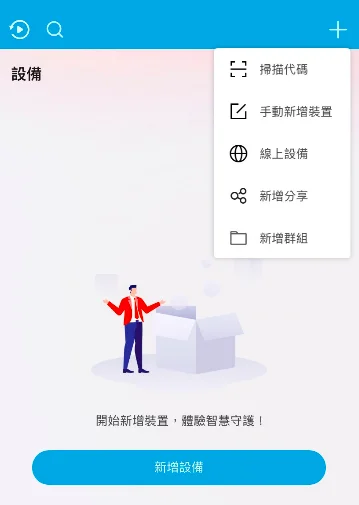
Cloud P2P: scan and go, no static IP required
No more fiddly network configuration — HiLook Vision uses Cloud P2P.
- Zero configuration: your devices need no static IP and no router port mapping.
- Add in seconds: open the app, scan the QR code on the device, and it is bound to your account.
- Connect anywhere: as long as both the device and your phone are online, you get a stable remote connection.
Screenshots show the Chinese-language build of the software.
Live view and two-way audio
Carry your cameras with you, and talk to the people on site.
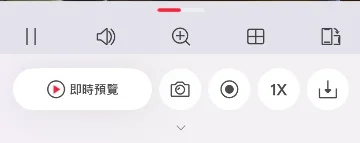
- Multi-view preview: single or split-screen layouts let you watch several areas at once.
- HD / Basic switching: change the stream quality to suit your connection and keep playback smooth.
- Two-way audio: on cameras and intercoms with a microphone and speaker, talk to people on site straight from the app.
- PTZ control: with a PTZ camera connected, swipe on your phone to pan, tilt and zoom.
Screenshots show the Chinese-language build of the software.
Playback and backup
Missed it live? Pull up the recording any time.
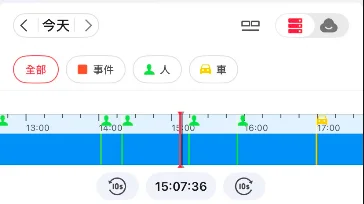
- Remote playback: read recordings straight from the NVR/DVR hard drive or the camera SD card.
- Local backup: record a clip or take a screenshot and save it to your phone gallery, ready to share as evidence.
- Timeline search: drag along the timeline to find the moment you need.
Screenshots show the Chinese-language build of the software.
Push notifications
You do not have to watch the screen — the system tells you when something happens.
- Instant alerts: when a device detects an event — motion, intrusion, a doorbell call — the app pushes a notification straight to your phone.
- Tap through: tapping the notification jumps straight to the event playback.
Sharing and permissions
Control who can see what.
- Owner account: the first account to add a device becomes the administrator, with full rights.
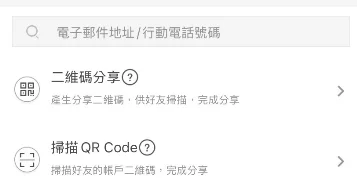
- Device sharing: the administrator scans another account QR code to share a device with family or staff.
- Granular permissions: choose what each person gets — live view only, playback, alarm notifications — so privacy stays under control.
Screenshots show the Chinese-language build of the software.
Why use this tool?
- Cloud P2P needs no static IP — scan the code and you are connected.
- Everything in one app: live view, playback, intercom, alerts and sharing.
- Available on both iOS and Android, so your site is with you wherever you are.
Need more help?
For technical questions or further support, get in touch with our team